

Trash and restoring files
Where deleted files go and how to restore them from the app or the website.
Updated on 2 November 2026
With ArchiviOnline a deleted file never vanishes at once:
- if you delete a file in the folder on your computer, it goes to the archive trash;
- if a file is deleted in the archive, on your computer it goes to the system trash (Windows, Mac or Linux), where you can restore it.
Restoring from the app
The Trash section lists deleted items, newest first, with the date and where they were deleted from.
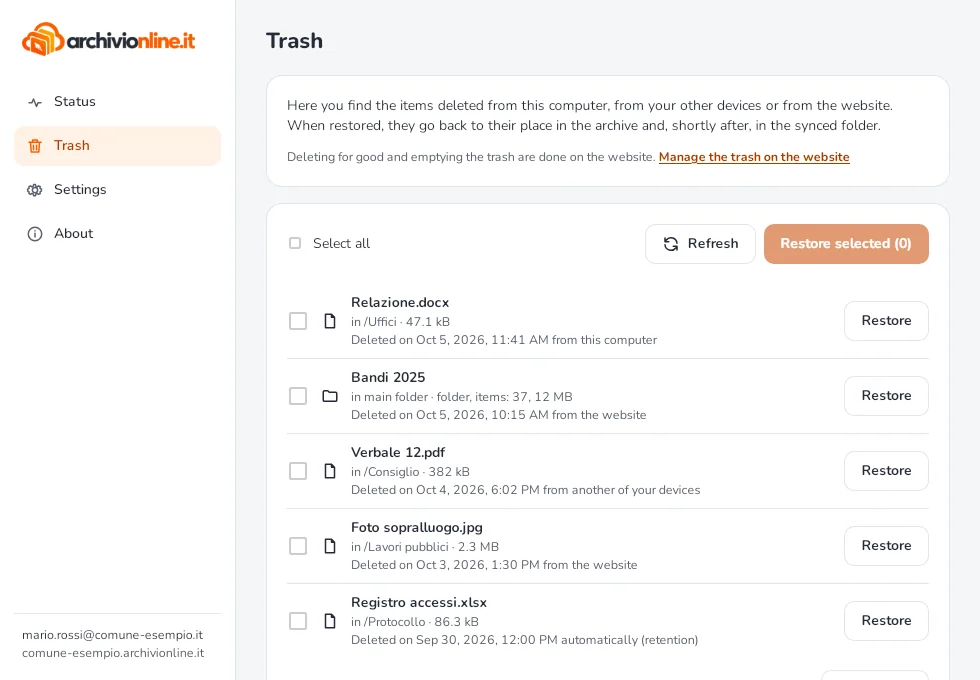
- Find the item in the list.
- Select Restore on its row, or tick several items and select Restore selected.
- Wait a few seconds: the items return to the synced folder and to your other computers.
If another file has taken the same name in the meantime, the restored one is called, for example, Report (restored).docx. If its original folder no longer exists, the item returns to the main folder.
Permanent deletion
Permanent deletion and emptying the trash are done only on the website, with Manage the trash on the website. If your archive isn’t updated yet, this button is all you’ll find in the app’s Trash section.
The trash counts towards your storage: emptying it on the website frees up space.
Still stuck?
Contact HostingPerTe.it support: tell us the app version, your system and what happened.