

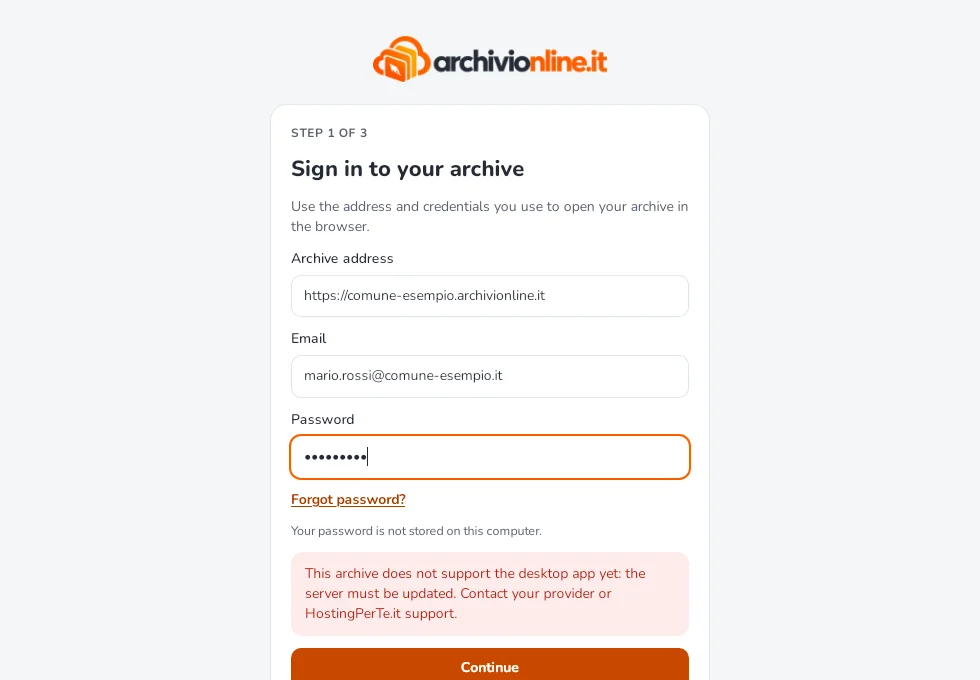
“This archive doesn’t support the desktop app yet”
What the message shown after entering the archive address means, and what to do.
Updated on 6 October 2026
This message appears during the first sign-in, after you enter the archive address.
What it means
The address is right and the archive responds, but the server it runs on doesn’t yet have the version that talks to the desktop app. It isn’t a problem with your computer and there’s nothing to fix in the app.
What to do
- Check the address: it must be the one you open in your browser to reach your archive.
- Contact whoever manages your archive: your organisation’s administrator or HostingPerTe.it support, who will schedule the archive update.
- Use the browser in the meantime: all archive features are available on the website.
Once the archive is updated, open the app again and repeat the sign-in.
Similar messages
- “The version of this archive is too old for the desktop app”: as above, the archive server needs updating. Contact whoever manages your archive.
- “This address is not an ArchiviOnline archive”: the address opens a site that isn’t an archive. Check you entered the same address you open in your browser.
- “This version of ArchiviOnline is too old for this archive”: here it’s the app that needs updating. Select Download the latest version and install it from the Download page.
Still stuck?
Contact HostingPerTe.it support: tell us the app version, your system and what happened.